[ad#g-vert-textimg-600]
Today after starting XP with the “Last Known Good Configuration” option I lost the network connectivity on my Desktop. Although Internet was working fine but “Microsoft Windows Network” would not list my network computers and when I tried the Network Connection repair option, the error message I kept getting was “Windows could not finish repairing the problem because following action cannot be completed: Clearing NetBT”.
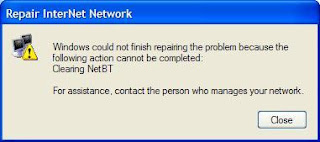
So the logical approach was to first find a method to clear NetBT and after following these steps below, I was able to clear NetBT and get my network connectivity back in XP.
TCP/IP stack repair method for use with Windows XP:
- Start, Run, CMD to open a command prompt.
- Reset WINSOCK entries to installation defaults: netsh winsock reset catalog
- Reset TCP/IP stack to installation defaults. netsh int ip reset [log_file_name]
Note: the log_file_name needs to be specified, e.g. netsh int ip reset reset.log

Great info, I have the same problem. Only 1 questin, where do I find (the name of) the log file?
Mark
hey Mark,
log_file_name can be anything of your choice.
Thanks…..
It worked for me….
Thanks Rubayat, that issue was starting to pull my chain,
I had the same problem and set it right . Thank you very much
Thanks man it worked but i had to restart it after every steps…am grateful
thanks men i awe you one….
done that already…still experiencing same problm..is there any other way?
Rubayat,
I don’t know enough to choose a log_file_name, so I tried your example and got “the following command was not found” – can you suggest what I try instead, or does it mean the fix won’t work for me?
Thanks!
Thank you. I can use my workgroup. hihi
Worked Like Magic! Thanks!
thanks
thank you alot. It very useful. thanks
Great tutorial. Helped a lot. This is really unrelated, but I was kinda hoping to get the HTML code for the “Sharing is caring” part. Or could you tell me how you made it like that? Ehehe. Thank you! 🙂
Its a WP plugin called SexyBookmarks.
thanks man! it really worked to my PC!
Perfectly worked!
Should be said that no process ‘netbt’ or alike
was found before and after curing.
Works perfectly!!!! Ty very much >:D<
I did this but first I uninstalled the network card in device manager. then followed these instructions.
It worked then.
Thank you.
This post is quite old but it saves my day! Thank you very much dude!
Hi
thanks,
I have tried out your solution and found very help full.
Regards
Viral
THX MAN !!! 3 min long and i destroyed my computer if i didn’t seen your post !!! THX AGAIN !!!!! (sorry for my bad english)
Thanks man, I owe you :D..Drink something on my bill 😀
Thanks great.
Thank you very much for the help…It really helped me a lot..thanks once again…
This solution worked like a charm. Cheers!
Solved a long standing problem – Thanks for your efforts