Finally!! A permanent solution in order to prevent WordPress from filtering line breaks "<br>" from a post.
In spite of trying various methods such as putting line breaks "<br>" inside "<code>" tag and many other such HTML tricks (many of which can be easily found at WordPress) just to be able to put multiple intentional line breaks in a post, wordpress would eventually manage to filter those line breaks. Even if the tricks were successfully applied, when it came to re-editing a post, all efforts would go to vain when TinyMCE initiates its own filtering process.
WordPress has a built-in powerful post/text editor commonly known as the “Visual” editor, which uses the open source project named “TinyMCE“. When switching from Visual to HTML editor in WordPress or vice-versa TinyMCE executes a back-end filtration process which removes empty tags, and <br> tags from the post.
Needless to say, it is very irritating when a author is forced to loose his/her creative ideas by forcing these kind of annoying and unnecessary filtration. Many has expressed their annoyance regarding this issue, as evident HERE.
Most of the time I would just reverse engineer stuff that really bugs me, silently and without complaining. But this time around I have found a solution for this problem without any reverse engineering.
TinyMCE-Advanced from wordpress is a wordpress plugin, which adds the option to disable the removal of <p> and <br> tags when saving a post and in the HTML editor (autop). After installing-activating, the option to enable line breaks can be found in the Settings->TinyMCE Advanced panel.

The plugin along with adding the functionality mentioned above provides the ability to add many more very useful buttons in the Visual editor, which is a big plus.
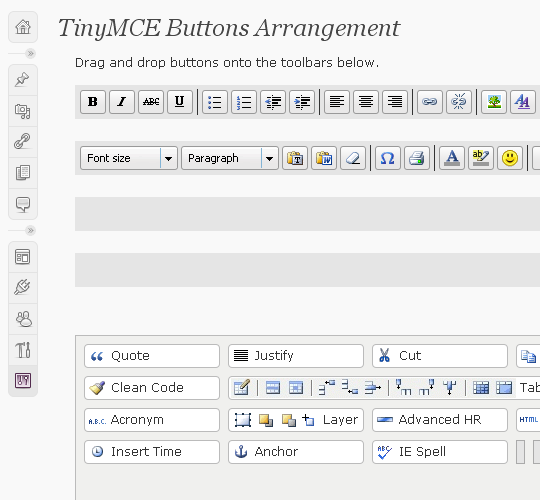
Blogging should be a little more easier from here on with the freedom of unlimited line breaks in wordpress :)…
Please feel free to suggest other ideas below and/or let me know if this did the trick for you too.

Thank you for pointing me to Tiny MCE. I am really glad to know about it; maybe my hair that I pulled out will grow back!
🙂 I am glad Jo Anne that it was helpful. Thank you for your comment.
You are a saviour! Thankyou!
You rawk man. A LIST FULL OF COMMENTS at another blog post about how to break lines came up useless.
Yours linked here… PROBLEM SOLVED.
Thanks!
For some reason, this partially fixed my issue, but the editor is still taking out half of the tags and replacing them with . Does anyone know the underlying PHP file that controls the WP logic on this? I want to strip out the find/replace PHP function since nothing else seems to work. I found several other suggestions… one said to use but when I do that, WP then adds an extra … it’s totally crazy. Thanks for the above suggestion, I never noticed that checkbox in TinyMCE.
… my html code was stripped out of the above post …
the code was ( … but that doubles up my line breaks
your code didn’t come… but what tags are exactly getting replaced though?
you can try modifying:
/path/to/wordpress/wp-content/plugins/code-markup.php
and look for something like,
add_filter(‘the_content’, ‘…’, ‘…’);
I am not sure, if this will fix it but let me know if it does.
yeah parker I’m still having the problem too. Rubayat I am sure that you do indeed rock, but apparently I need more rocking to rock my problem away. It’s still stripping out my br tag on one of the “pages” (this one: http://syzygysailing.com/crew) For the life of me I can’t get the text to always start below the image
It exactly what I needed. now I use this plugin especifically for BreakLine et Blocquote button ! Thanx a lot.
Gracias! Lo unico que funciona… y de maravilla!
You rock. World needs more souls like you.
Sorry. the comment before removed some html tag. I rewrite the comment.
I am using wordpress 2.7.1 and TinyMCE Advanced 3.2. I also enabled the option “stop removing br and p”
It allows me to add break line in the Visual View. However, it also add an extra break line at the beginning and the end of the content whenever I save or update the content from visual view. Is there anyway to fix it?
woow.. really thanks for this. i am tired that my post always shrink due to the removal of “BR” tag.
hope no more.
thanks again
thanks !!
Thank you for this information. It seems to have gotten even more strict in WordPress 2.8 Used to be able to include arbitrary space here and there, but now it’s all gone.
Searched all over and never could figure out how to stop TinyMCE from stripping my br and paragraph tags. I installed TinyMCE Advanced, and everything is working PERFECTLY.
Thanks Rubayat!
Thanks, this works just fine for me!
I can’t add a in the html tab, it won’t work. But I can add line spaces in the tinyMCE editor, and it works no prob with the plugin installed.
AHHHHHHHHH!
thankyou for this post.. best solution so far!
Finally a nice solution :), the boss was constantly complaining that the breaks weren’t saved. Thanks Rubayat, you saved me a lot of walks to the bosses office.
Thanks for the tip. I fixed the issue before, but couldn’t remember how. Thanks!
Hm br is changed into p and /p afterwards (with the before and after it)
Either way it works so.. Im happy. 😛
Thanks very much, it worked wonderfully!
THANK YOU for mentioning the plug-in! It worked perfectly! I’m laughing at Jo Anne’s comment above. LOL. I totally feel sympathize. It was driving me utterly bonkers! LOL. Thanks again! 😀
Thanks for this post. It has somewhat fixed the problem but not 100%. I don’t understand why the hell WordPress decides to strip out BR tags.
When enabling the option you mentioned, all it does is create a new CSS class called br_fixer and whenver I type out a proper BR tag, it gets replaced with a P tag using the br_fixer class so instead of getting a clean line break, I get two line breaks.
All I want to do is use a simple BR tag
yeah I know its annoying as hell!! but it at least provides “an” easy solution for the time being 🙂
Thank you, this worked wonders!
thanks for this tip. but why wordpress remove br tag automatically?
works like a charm! thanks!
Thank you for posting this, works like a charm.
Excellent. I use TinyMCE Advanced and I didn’t even notice that option!
Love it, Thanks.
Very helpful. It makes WP a whole lot better. Thanks a lot!
Thank you very much!!
This plugin really help me.
You are a saviour!
Thanks. I was getting of cursing at my screen about where the hell my went.
Really cool post! Thank you for your information ^^
Thank God! We’ve been struggling for months trying to make our models portfolios look nice…We are so grateful for this plugin!
No need to curse anymore! Thanks for letting us know about the post. Our chlorella website looks proper now!
THANK YOU, THANK YOU, THANK YOU, THANK YOU!!!!!!!! =) =) =)
Thanks a million bucks for this solution. You don’t know how much I have spent trying figure this out. THANKS AGAIN.
Here we are, a year later, and this is both still the best answer, and sooooo much less than perfect! This editors plugin must constantly fight with the underlying structure of WP, and so it still refuses to allow you to have exactly what you lay out in your editor.
Thank you… I’ve been stumped by this as well… now to go back and reformat all my older posts!
This post really helps me to make a line break. Uff so much difficult for me before to put an line break. Thanks
Yes… thanks.. great tip
I can’t get it to work… WHICH icon is for br???
Thanks!
(This issue is making me nuts. Really is making me wish I were on blogger! )
Hi Rubayat,
Many thanks buddy for sharing this great suggestion on web. I was having the same line break issues on few of our projects. This is the perfect solution I was looking for. Thanks again!
i activated plugin and changed setting to allow line breaks. now when i type a line break it wraps it in a paragraph tag!!!!
Just wanted to thank you for providing the solution to BR tag issue. I was frustrated when I couldn’t get the BR tag to stick.
I already had TinyMCE installed but did not know that it could fix it.
Thanks again.
This issue is quite annoying so I am thrilled to have found something that could possibly solve it. I just upgraded to WordPress 3.0. Do you know if this fix works with WP3?
Thank you in advance!
John
Well, it didn’t work for me. I’ll have to keep searching. Thanks for the post. I’m still glad that it worked for other people.
John
I take that back, it did work. Please don’t think of this as comment spamming, I just didn’t fully understand how it worked. I typically work in the HTML instead of the visual editor. This plugin DOES work in WP 3.0.
John
Thanks so much bro!!! I was literally pulling my hair out trying to figure out how to beat wordpress and use the break tag. You’re the man! Will definitely be back for more plugins in the future. ; )
I perfectly worked for me on WP-3. Thanks for my first self-installed plugin
OMG, Thank you! You have saved me so f-ing much time and heart ache. Thank you!
Thank you! After a gruelling two days of setting up WordPress as my website CMS I had all but given up on unclunky formatting… Your post sent me in the right direction and taught me (a WordPress newbie if there ever was one) how to tweak the plugin exactly. That explanation is a life-saver! Cheers again!
Sounds interesting. I have also faced the same issue with WordPress visual editor. Will sure give it a try. Thanks for sharing.
Thanks alot for sharing… been looking for this for a while!
// Jimmy
Thanks Rubayat. The removal of line-breaks has been driving me crazy for ages. A solution at last!
Thank you for this wonderful post. This saved me from MORE hours of this headache issue. Thank you
One word – legend!
Thanks
Chris
I’ve always had TinyMCE Advanced installed but never noticed that option! Thanks soooo much!
This isn’t working for me. I put it on 2 sites. What might I have done wrong? Can someone tell me the steps I should have taken?
After I installed it, in the wp-admin area, my post that I was working on got real wide and was overlapped by the side bar info.
And it had no effect on the spacing between my paragraphs.
Thanks.
Thank you for the post. It was driving me crazy every time I saved an article and WordPress will remove the !
Keep on sharing knowledge!
tinymce not display on editor. i’m use wp 3.0
Thank you! That was driving me crazy!
this drove me crazy. Thanks for your help!
Works, BUT, if you flip between Visual and HTML tabs, then the problem comes back 🙁
The editing buttons are too much to manage in my screen. Do you have any idea to put them into two line in visual interface?
Thanks a lot! This has been a constant problem when using WP as a CMS for websites. The plugin works just fine for me.
Finally a solution so a HUGE thank you from me for providing this info. I will share on Twitter!
Thanks for this, saved a lot of pain reformatting my webpages.
Brilliant! Thanks a lot! 🙂
Hi Rubayat,
I spent more than two hours trying to find a solution to the problem of disappearing HTML tags when switching back-and-forth between HTML and rich visual editor in WordPress. You explained the problem clearly and gave an elegant and useful solution. You rock. Thank you so much. TinyMCE Advanced is a wonderful plug-in.
You made my day…Simply brilliant!Thanks a lot!
Wow, that finally solved the spacing problem! I thought I was going loony with WordPress stripping out my br and p breaks every time I did an edit! What a relief! Thanks for sharing!
Thank you. I can actually go to sleep now. I could not for the life of me figure out how to get the to work and now it’s working perfectly. Thank u!!!
Thx man, keeps disappearing and it’s so annoying. Seems to me solution’s found 🙂
I wrote a small article referencing your article. It was great to find out (finally) how to add a simple line break!
http://www.blogsnewsreviews.com/2011/05/10/how-to-add-a-paragraph-break-in-wordpress/
Only thing is even with this plugin installed the tags have no effect. Using a did work though. Thanks!
Ahhhhh! It works! Thank you so much, and even though this is “old” I wanted to comment so you k new you are STILL helping people.
Cheers!
Oh man, I was looking so hard and long to find this fix, i even posted on word presses help site. cant believe i finally found the answer in a 3 year old post. thanks
THANK YOU!!! OMG, I LOVE YOU! LOL 😉 This is so awesome, TinyMCE changes the whole game lol. wow this really saved me a bunch of time and agony! Thanks bro.
Let me join those singing your praises. I spent three hours on this last night, utterly befuddled. Your write up is a model for technical writing: you explain the problem and present the solution so clearly that even a novice like me can resolve the problem. Many, many thanks!
Nice trick
let’s see if that line break really worked.